Data Storage & Retention
An encounter contains several records with different access rules: uploaded audio, transcript segments, generated notes, patient metadata, and messages. Browser recording also uses temporary local storage before upload.
Where your recording is processed
When you submit a recording, noctune uses two subprocessors to turn it into a draft note:
| Step | Subprocessor | What it receives |
|---|---|---|
| Speech to text | Deepgram | The submitted audio, to produce the transcript |
| Note drafting | Amazon Web Services (AWS) | The transcript, to draft the SOAP and discharge notes |
noctune then stores the audio, transcript, and generated notes in its own systems under the retention rules below. The iOS app asks you to agree to this processing the first time you sign in, on a How your recordings are used screen shown after the Terms. noctune’s Privacy Policy is the authoritative statement of how your data is handled.
What remains available
| Record | Standard behavior |
|---|---|
| Transcript and speaker segments | Remain available with the encounter |
| SOAP and discharge-note versions | Remain available with the encounter, including audited edits and regenerations |
| Patient and encounter metadata | Remain available with the corresponding records |
| Encounter messages | Remain in the encounter and Messages inbox |
| Audio, first 31 days | Playable and downloadable |
| Audio older than 31 days | Gated unless the billing workspace has Long-term Storage or Sentinel preservation |
| In-progress browser recording chunks | Stored temporarily in that browser for crash recovery |
The retention check uses the encounter creation time. Audio becomes gated when it is more than 31 whole days old—not at the start of day 31.
Audio after the standard window
Without Long-term Storage, an older encounter shows Audio archived in place of the player. The banner gives the recording age and a Restore Audio action that leads to the storage upgrade path. The SOAP note and transcript remain readable while audio is gated.
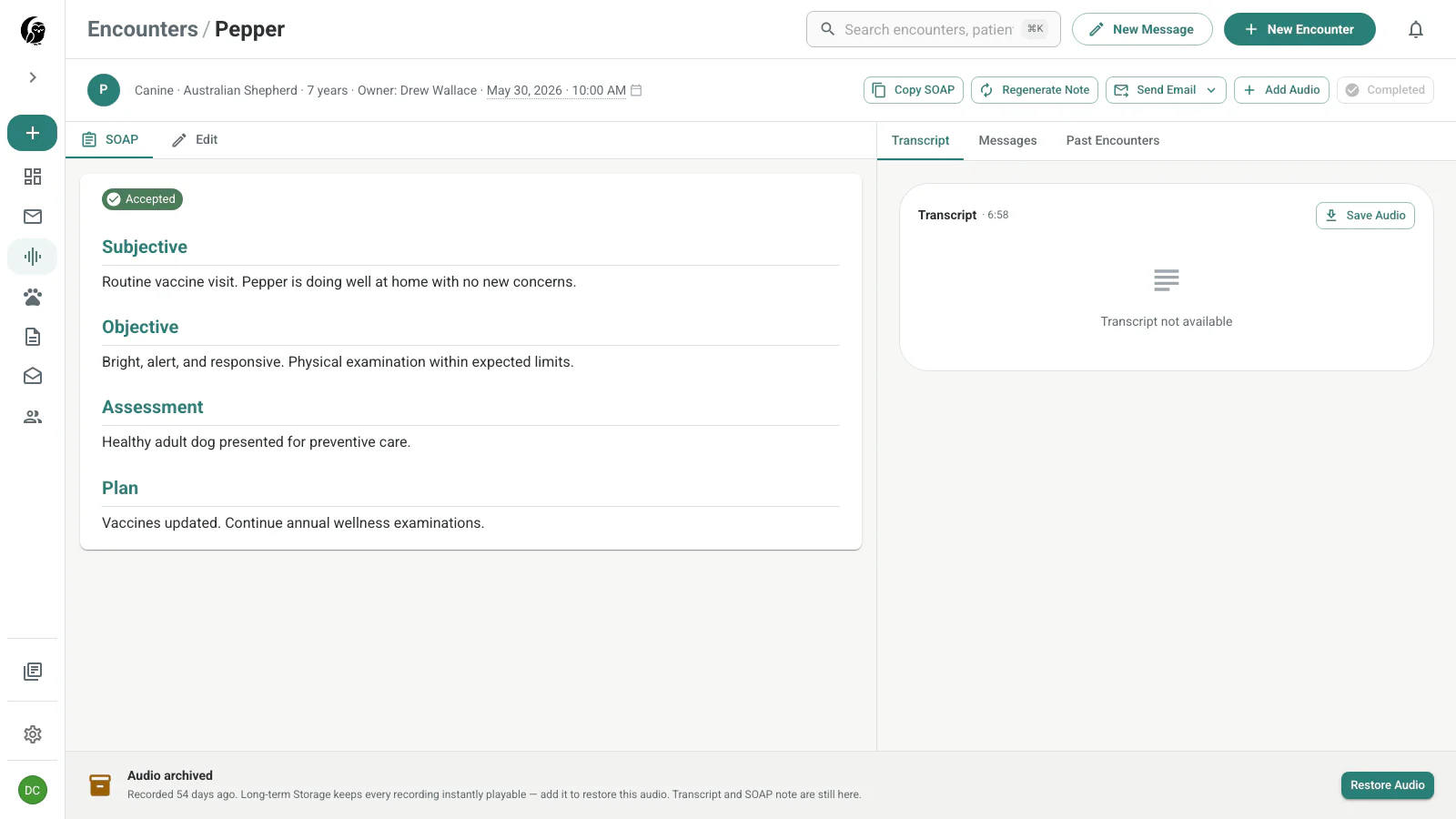
Long-term Storage keeps recordings instantly playable beyond the standard window. Access is based on the active personal or practice billing workspace.
Sentinel preservation
noctune Sentinel bypasses the normal audio gate for an encounter marked for client hostility. Its audio stays available for protective documentation even when the workspace does not have Long-term Storage.
Browser recording recovery
During a live browser take, noctune writes recovery chunks to IndexedDB on that device. The local copy lets the recovery prompt offer upload, download, or discard after a crash. Successful upload or explicit discard removes the corresponding local session.
If IndexedDB is unavailable, the recording stays in memory and the drawer warns that crash protection is unavailable. Closing the tab can then lose the unprocessed take.
Deletion and account policy
Archiving audio is not the same as deleting an encounter: the clinical record remains present. Patient removal is also a soft archive and does not delete existing transcripts or notes. For an account-level export, deletion request, or organization-specific retention requirement, contact noctune support before changing access to the account.
Veterinary records are not generally HIPAA-covered records in the United States, but your organization may have its own legal or contractual retention duties. Follow those duties when deciding what to export or retain.