Templates
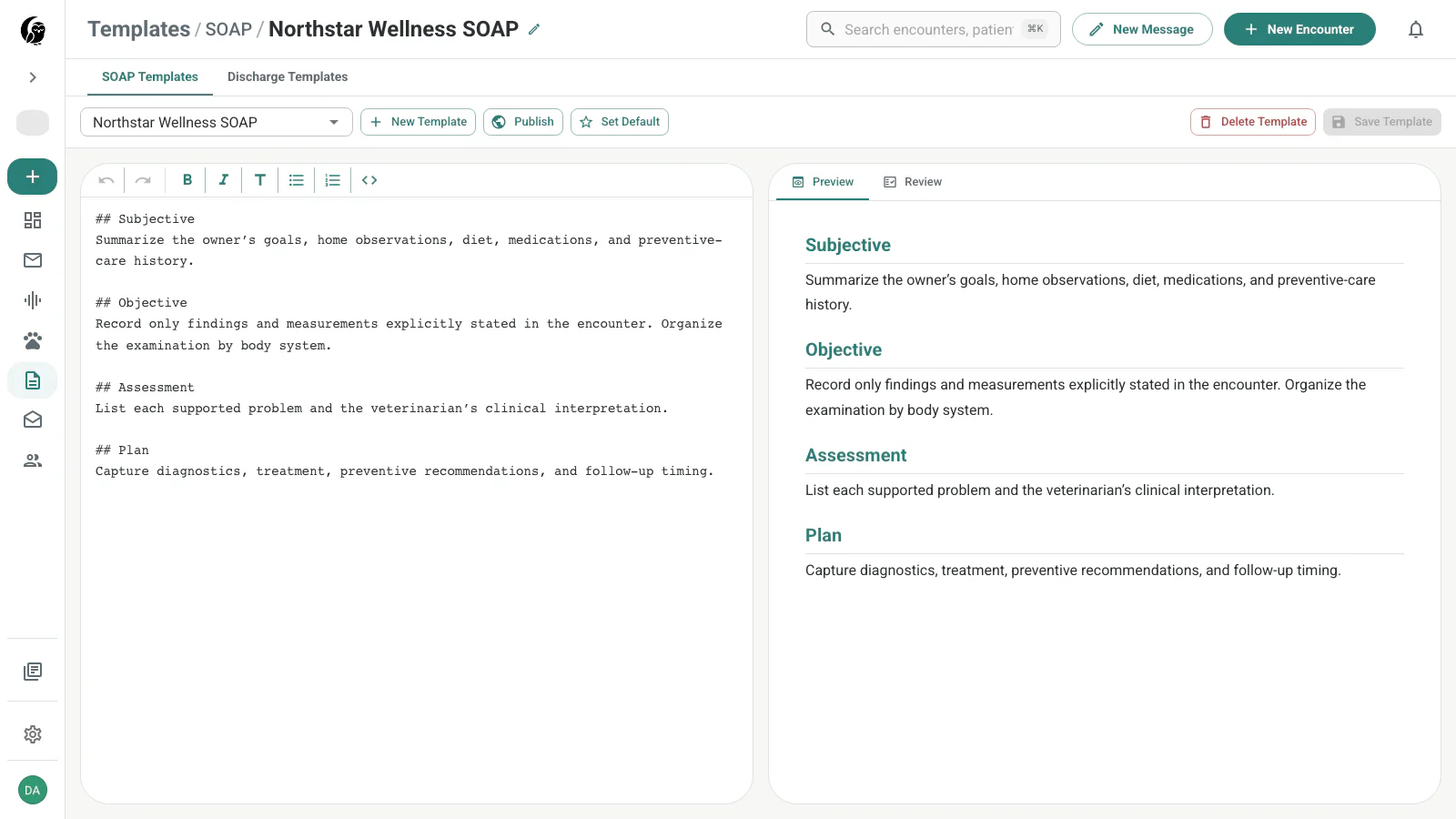
SOAP and discharge templates tell noctune how to structure generated notes. The editor keeps markdown instructions on the left and a rendered preview or quality review on the right.
Use the tabs at the top to switch template types. System templates are maintained by noctune and open read-only. Custom templates belong to you and can be edited, saved, set as the default, published, or deleted. The selector groups My Templates and System Templates and marks defaults and published templates where applicable.
SOAP templates
SOAP templates structure the internal medical record: the clinician-facing note noctune drafts from an encounter. Put Subjective, Objective, Assessment, Plan, and a concise record of Client Communications here.
Open SOAP Templates in noctune →
Discharge templates
Discharge templates structure the client-facing summary generated from an encounter. Put patient-specific home care, medication directions, warnings, follow-up, and recheck instructions here. noctune uses this content when you choose Send Discharge.
Open Discharge Templates in noctune →
Choose the right place for each job
Think of these as the chart, the take-home plan, and the reusable handout:
| Use | What belongs there |
|---|---|
| SOAP Template | The internal medical-record structure: Subjective, Objective, Assessment, Plan, and a concise record of Client Communications. |
| Discharge Template | Personalized home care, medication directions, warnings, follow-up, and recheck instructions. noctune uses this content when you choose Send Discharge. |
| Email Template | Reusable delivery or cover messages and client education, such as diet guidance, reminders, greetings, and signatures. See Email Templates. |
In this workflow, client literature means reusable education rather than a separate template type. Keep it in an Email Template so you can reuse it without adding the same material to every clinical note or discharge summary.
One large imported template can be saved as a SOAP or discharge template if it passes validation and stays within the character limit. Splitting it by purpose usually creates a more automated and maintainable workflow: the encounter generates the chart and patient-specific take-home instructions, while evergreen education remains ready to reuse.
Create a custom template
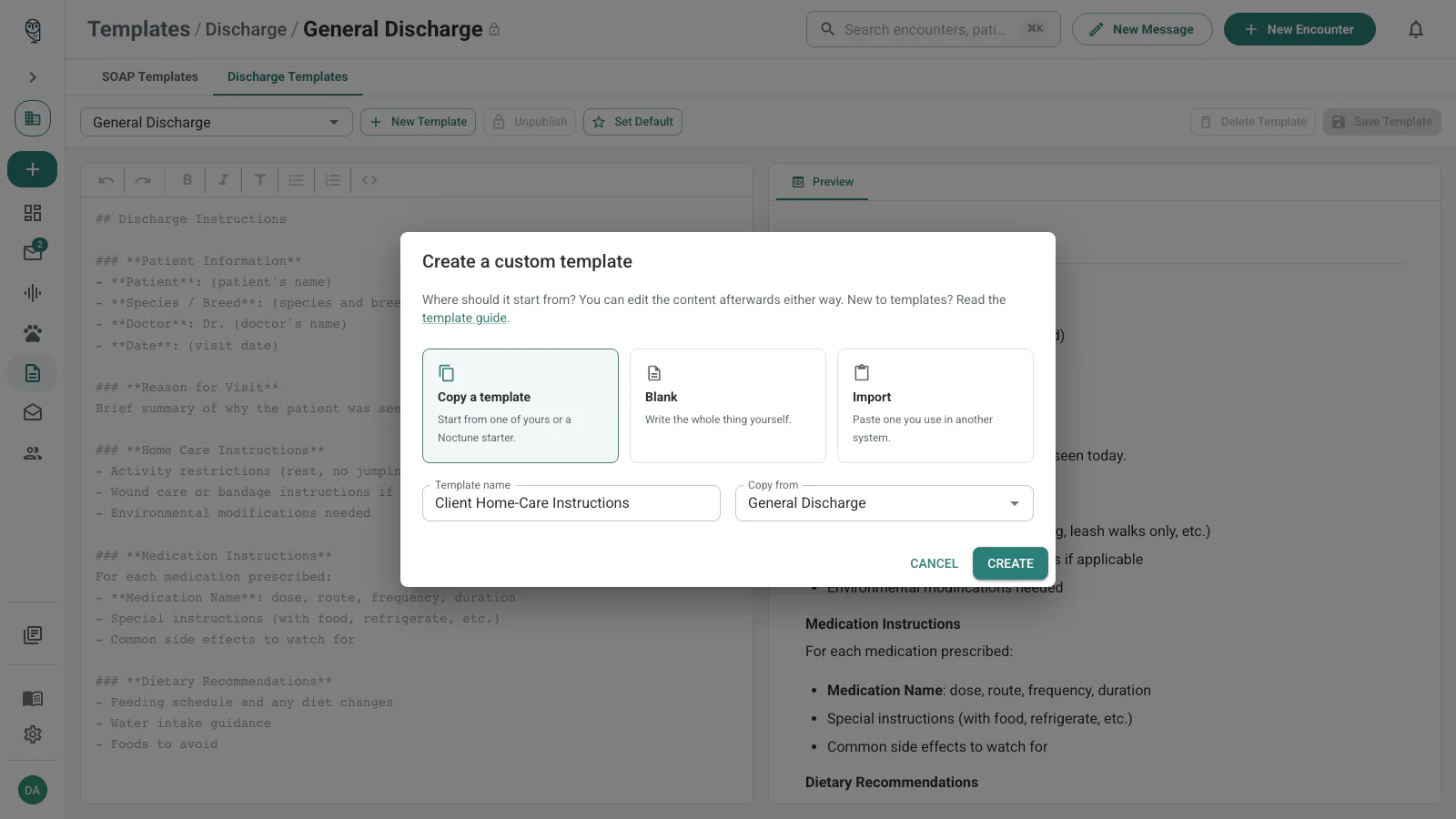
First select SOAP Templates or Discharge Templates; the active tab determines the new template’s type. Choose New Template, name it, and choose one of the three starting-point tiles:
- Copy a template creates an editable copy. This is the default, with a noctune starter preselected; use Copy from to choose one of My Templates or noctune Starters instead.
- Blank opens an empty, unsaved draft.
- Import lets you paste a template from another scribe or practice system and organize it before saving.
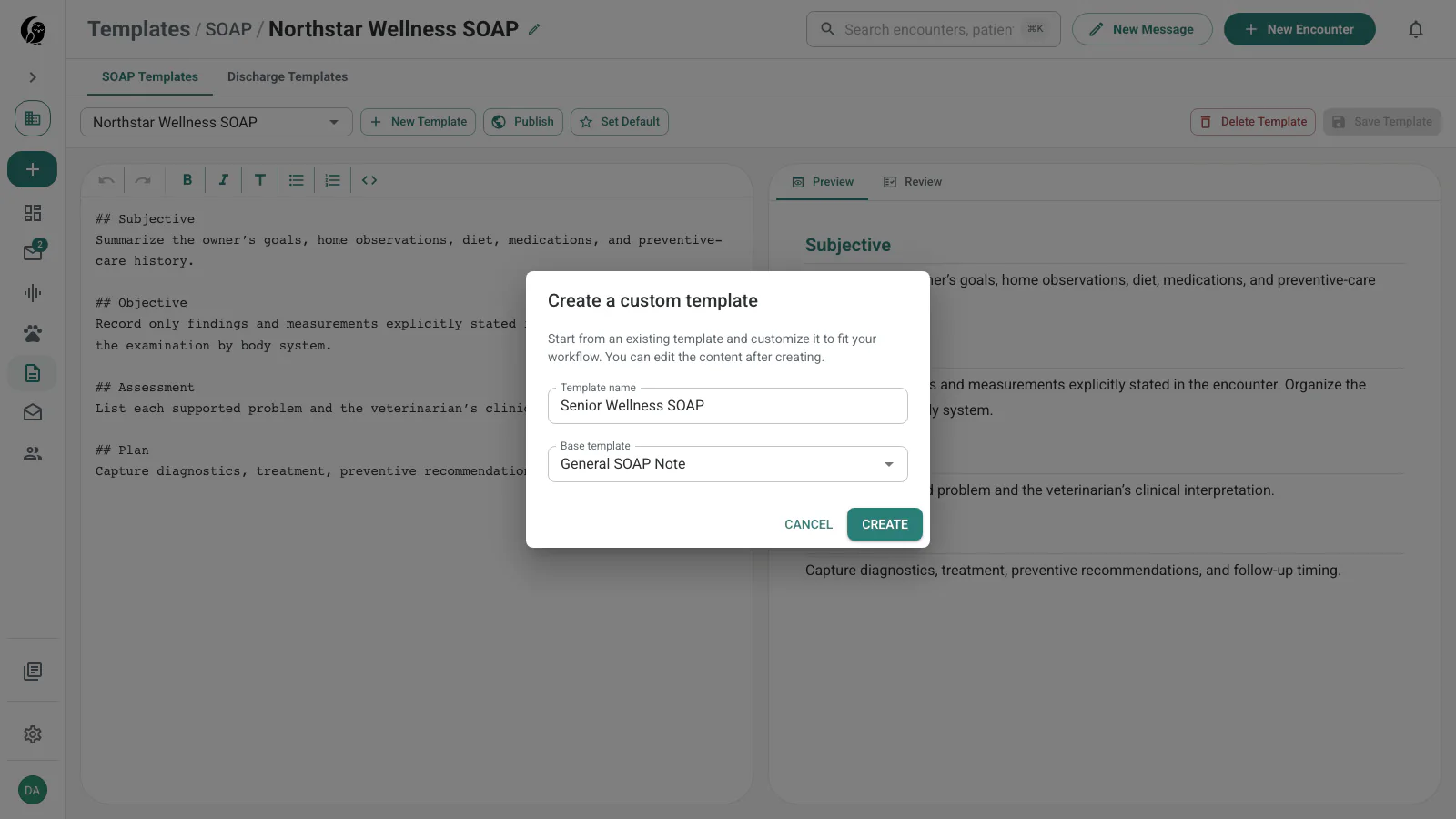
The discharge workflow uses the same creation dialog, but starts from the active Discharge Templates tab and offers discharge templates as starting points.
After creation, edit the plain markdown. The toolbar supports headings, bold, italics, bulleted and numbered lists, inline code, undo, and redo. Preview shows how those instructions are organized; it does not generate a patient note.
Import an existing template
To bring over a template from another scribe or practice system, choose New Template → Import. Name the new template, paste the original text, and choose Organize this. noctune always runs the organizer for imported templates; the word count beneath the paste helps confirm that you copied the complete source.
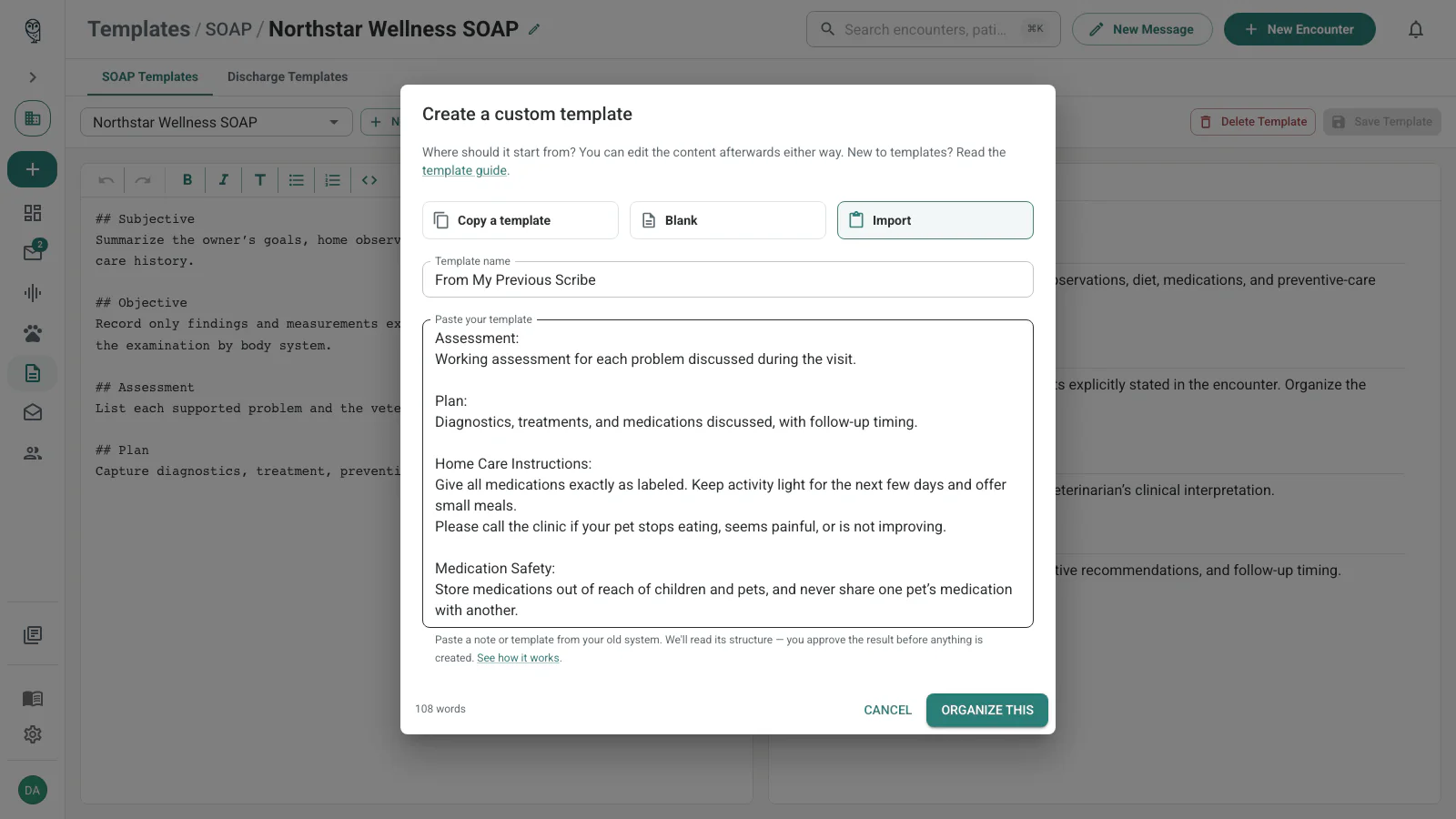
noctune analyzes the paste’s structure without rewriting it, then opens the complete original in an unsaved editor draft. If analysis fails, the paste still opens unchanged as one draft so you can organize it manually.
Review organizer suggestions
After Organize this, the right pane stays on Preview. An import banner above the editor identifies the draft as pasted text, keeps View original paste available, and reminds you that the current imported template is unsaved. The separate Review pane remains dedicated to quality-review text suggestions.
If noctune finds content that belongs in another template, the banner shows a suggestion with its proposed name and reason. The current editor retains the full paste until you approve that suggestion.
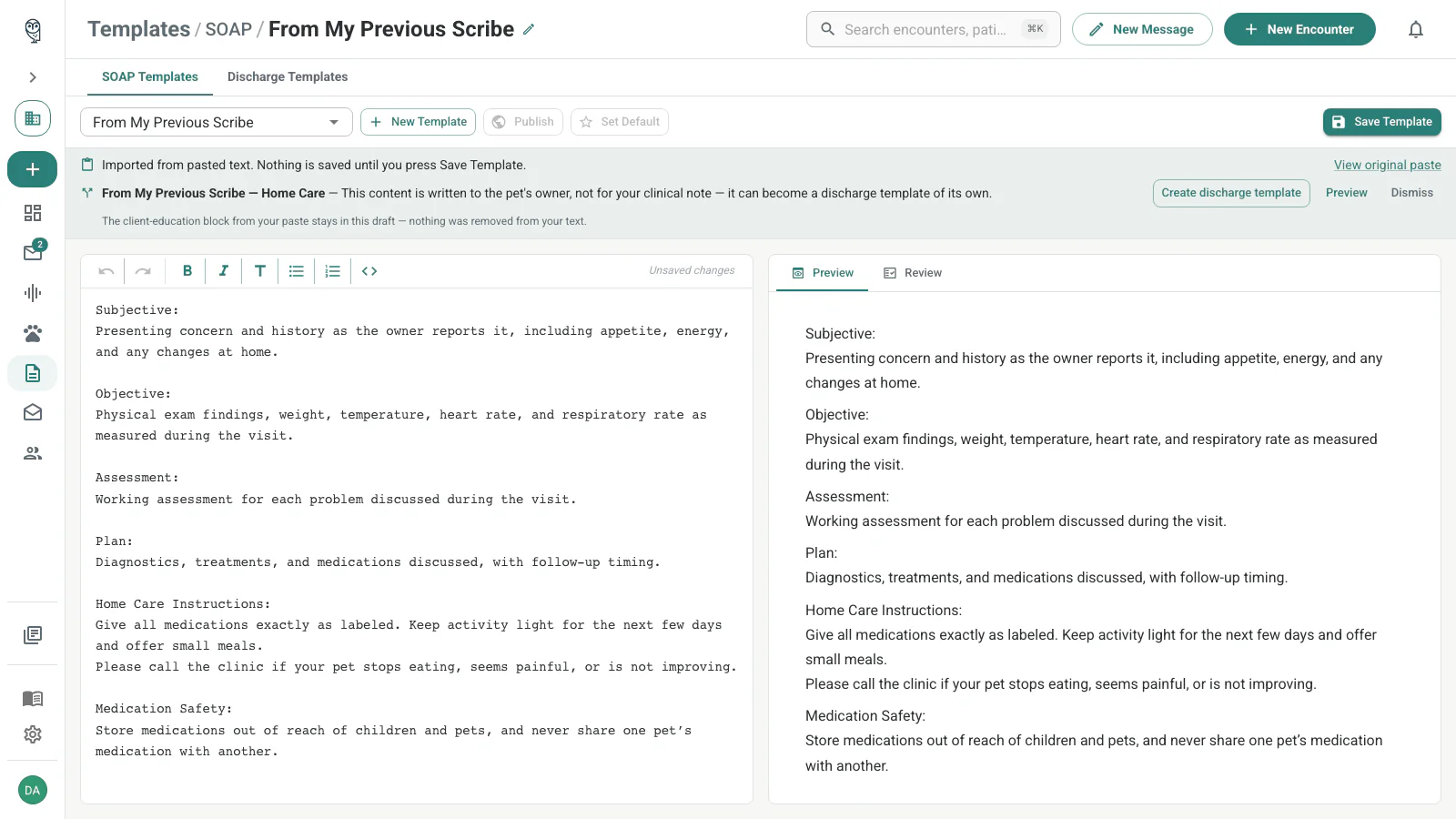
Review each proposal independently:
- Preview opens the exact markdown proposed for the separate template without changing either draft.
- Create SOAP template or Create discharge template immediately saves only that proposed companion draft, then removes its source blocks from the current unsaved draft when they can be matched safely.
- Dismiss hides the suggestion and keeps all of its text in the current draft.
After creation, the banner turns the suggestion into a receipt with Open and Undo actions. Open opens the created draft in a new tab. Undo deletes that split-off draft and restores its text only while you have not edited the current draft since accepting the suggestion. Otherwise, Undo is disabled; open the created template and delete it there if needed.
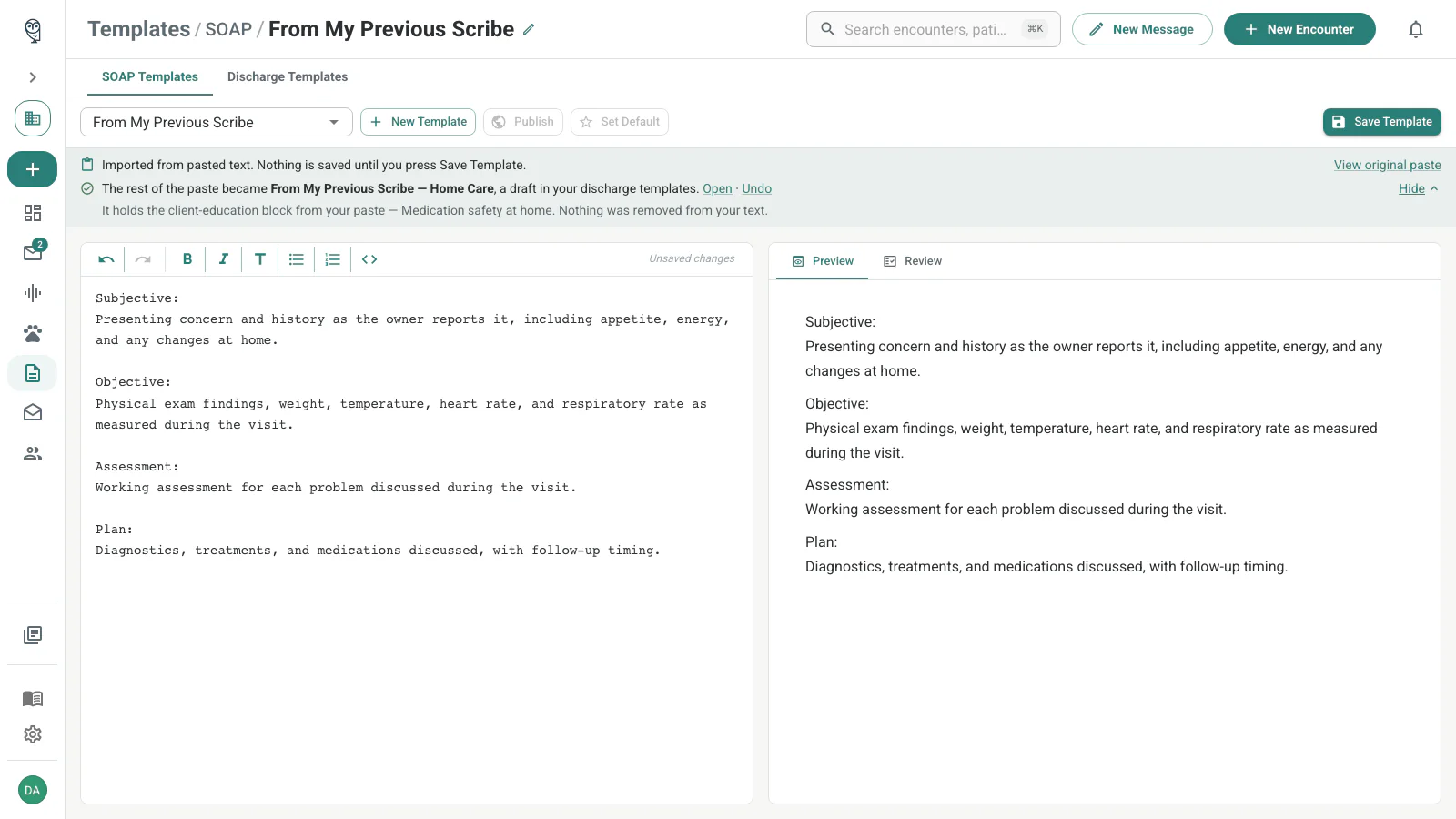
Client-education blocks stay with the proposed discharge content. Before you create that draft, the banner confirms that those blocks remain in the current draft. After creation, expand What’s in it on the receipt to see a summary. If the banner flags passages that do not clearly match either template, use View original paste to identify and preserve anything you need before accepting, then verify both drafts afterward.
Use View original paste to compare the unchanged source at any time before the current draft’s first save. Saving removes the import banner. Organizer suggestions create separate drafts; they are not quality-review suggestions, do not add to the Review tab’s count, and Fix All never creates or dismisses them.
Keep imported placeholders
noctune supports and preserves human-readable double-brace placeholders and instructions such as:
{{petname}}
{{drug name}}
{{him/her}}
{{1-year/3-year}}
{{ }}
{{If applicable, explain what changes the client should watch for at home and when to call the hospital.}}
noctune’s note generator interprets this text as guidance when it drafts a note. You do not need to rename or reformat the double-brace content before saving it.
This guidance is different from the resolved merge fields in Email Templates. SOAP and discharge placeholders are preserved as instructions for note generation; they are not replaced like patient, practice, or date fields in an email. Executable or unsafe template-engine syntax and prompt-injection attempts may still be rejected.
Review template quality
Choose Save Template after making changes. A valid custom template saves first, and then noctune automatically runs a quality review. You can also open Review and choose Review Template whenever you want a fresh review. The reviewer looks for sample values, missing sections, weak structure, unclear guidance, and clinical prompting best practices.
If a template cannot be saved, the editor identifies the affected field and gives the specific reason instead of showing only Validation failed. Template content has a hard limit of 50,000 characters. If your template is longer, separate the SOAP chart, discharge instructions, and reusable client education or email content.
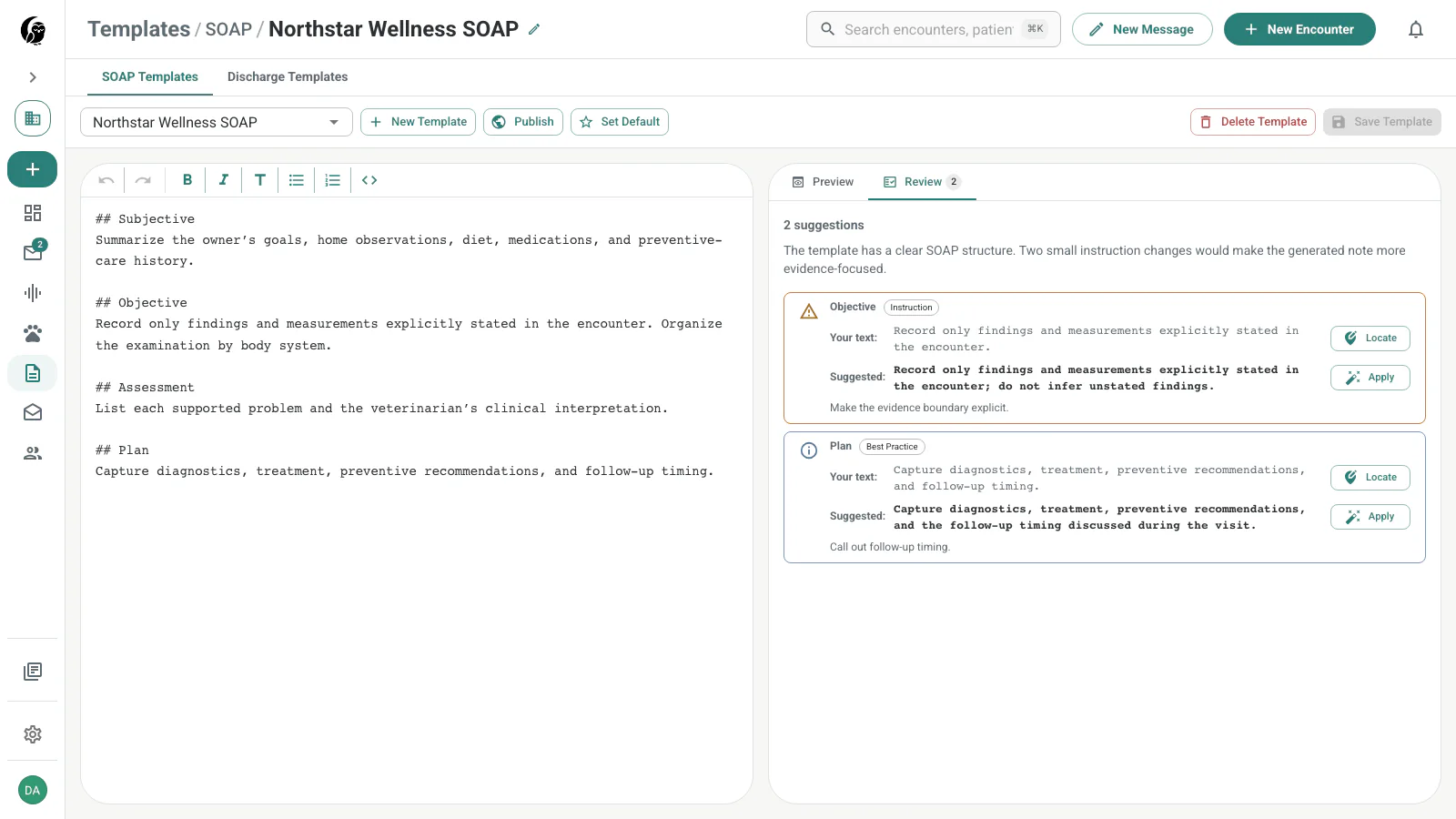
Suggestions are guidance, not a publishing requirement. Apply only the changes that are useful for your workflow:
- Locate selects and scrolls to the exact source text without changing it.
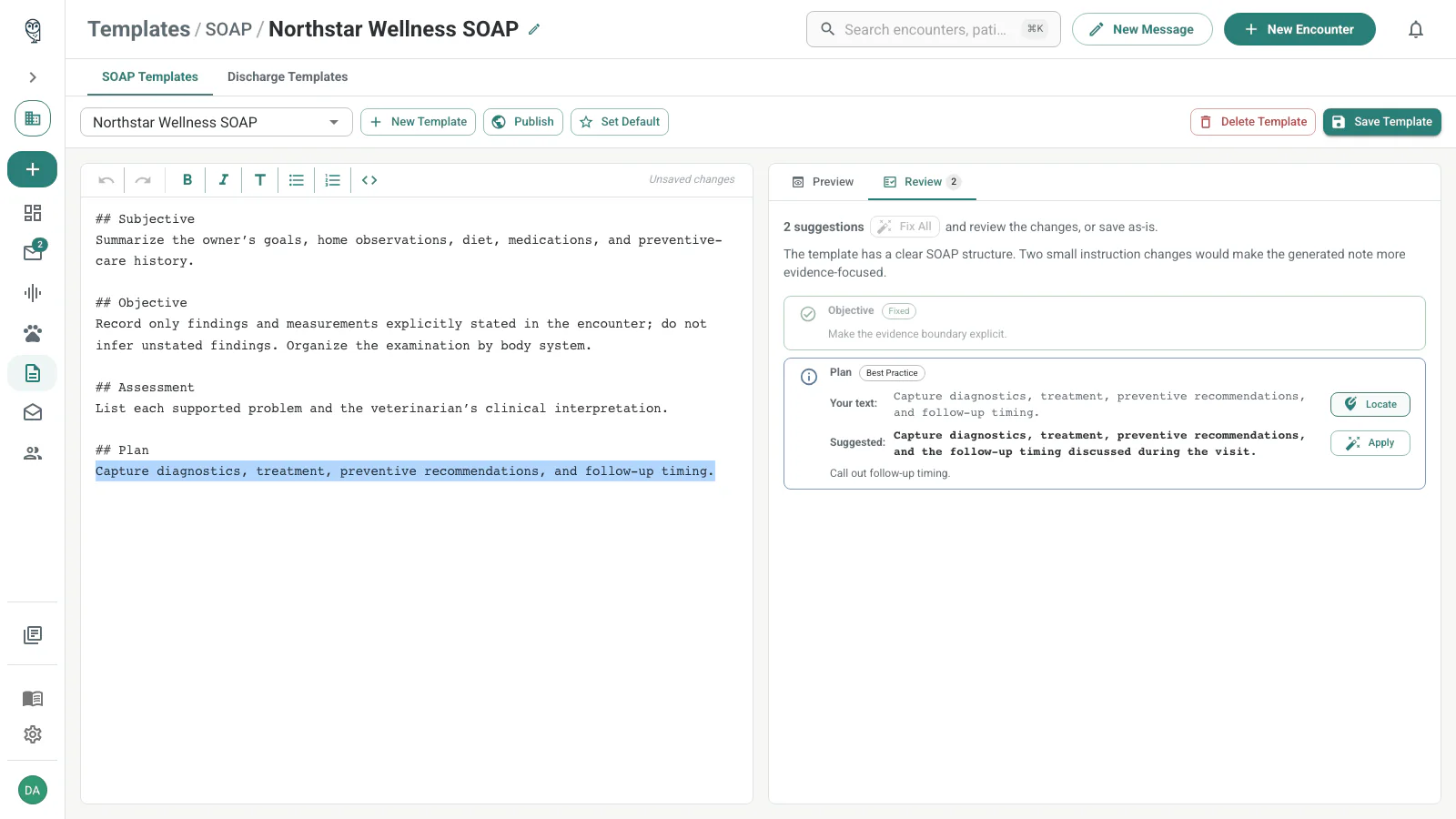
- Apply replaces that one occurrence and marks the suggestion Fixed.
- Fix All applies the complete corrected draft and opens Preview. It appears only when the reviewer can return a complete correction and stays enabled only while every suggestion still matches the unchanged reviewed draft.
After you apply one suggestion or edit the draft manually, Fix All disables because the editor no longer matches the reviewed snapshot. Apply the remaining suggestions individually or run a fresh review before using a batch fix.
The reviewer may recommend moving substantial discharge content out of a SOAP template, internal charting out of a discharge template, or evergreen client education into an Email Template. These are text recommendations only; use the separate import proposal actions to create another template.
Review the changed preview, then choose Save Template again to persist applied fixes. New encounters use the saved content, while existing notes are not rewritten.
Set the default
Choose Set Default on the template you want preselected for new encounters. SOAP and discharge defaults are independent. The default does not change existing encounters.
Publish to the community
Owners of saved custom templates can choose Publish. The confirmation explains that every noctune user will be able to preview, duplicate, and report the template. Add optional notes to tell other clinicians what the template is for.
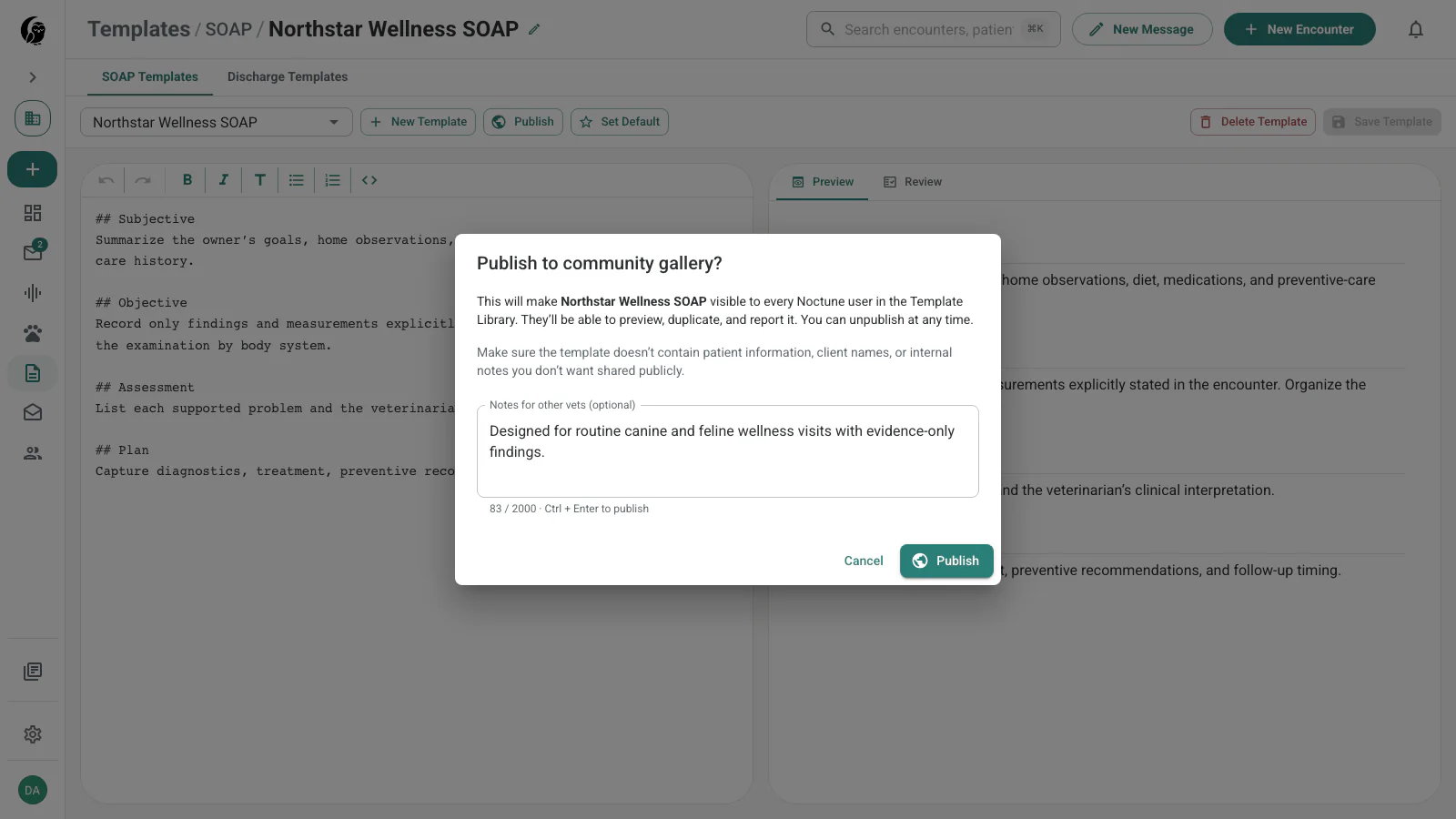
Remove patient information, client names, and internal-only instructions before publishing. Publishing is reversible with Unpublish; clinicians who already duplicated the template keep their copies.
Write reliable clinical instructions
A template is an instruction set, not a filled example. These patterns make the generated note easier to verify.
Give each section one job
## Subjective

Summarize the owner's concerns, symptom timeline, home observations, and relevant history.

## Objective

Record only examination findings, measurements, and test results explicitly stated in the encounter.

## Assessment

List each supported problem and the veterinarian's clinical interpretation.

## Plan

Capture diagnostics, treatment, client education, and follow-up timing discussed during the visit.
Avoid asking both Assessment and Plan for the same treatment content; overlapping instructions create duplicate prose.
State what to do when information is missing
If a finding or value is not stated in the transcript, omit it. Do not infer or invent it.This is especially important for vital signs, medication doses, diagnostic results, and follow-up intervals.
Prefer markdown headings
Use ## and ### headings on their own lines. Models and the noctune preview interpret them more reliably than all-caps labels or custom delimiters.
Put global conventions first
## Formatting conventions

- Use the units stated in the encounter.
- Refer to the patient by name.
- Use bullets for Plan items and prose for Subjective and Assessment.
- Preserve every stated abnormal finding.
Instructions near the top can apply to every later section without repetition.
Do not include realistic sample data
Avoid example patient names, weights, doses, and test results. They can be mistaken for encounter facts. Describe the source instead:
**Weight:** Use the weight stated in the encounter, including its unit; otherwise omit.Set baselines for routine exams (normal by exception)
For wellness or full-physical-exam templates where you examine every system on every
patient, you can pre-fill a plain baseline such as WNL on each exam line:
- **Eyes:** WNL
- **Ears:** WNL
- **Heart:** WNL
A baseline is a standing default, not sample data. The generated note keeps the baseline
when the encounter does not mention that system and replaces it when you dictate a
finding — “mild dental calculus” replaces WNL on the oral line, while the untouched
lines stay normal.
Use baselines only where silence truly means “examined and normal.” On a problem-focused
template, a system you never examined would still be reported as normal — keep
descriptive placeholders like (cardiac auscultation findings) there instead.
Keep baselines plain: WNL, normal, unremarkable, NSF. Do not pre-fill specific
values such as T 101.5 or grade II/VI murmur — a specific value reads as a real
measurement even when nothing was measured. The built-in Wellness Exam system
template is a worked example of this pattern.
Troubleshooting
My pasted template will not save
- Read the field-level message and correct the specific issue it identifies.
- Confirm that the template does not exceed 50,000 characters.
- If it mixes charting, take-home instructions, and reusable education, move each part to the appropriate SOAP, discharge, or Email Template.
- Contact noctune support if a legitimate import is still blocked.
Use a community template
The Community Template Library contains published templates from other clinicians. Choose Duplicate on a detail page to create your own editable copy; the published original stays unchanged.