Dashboard
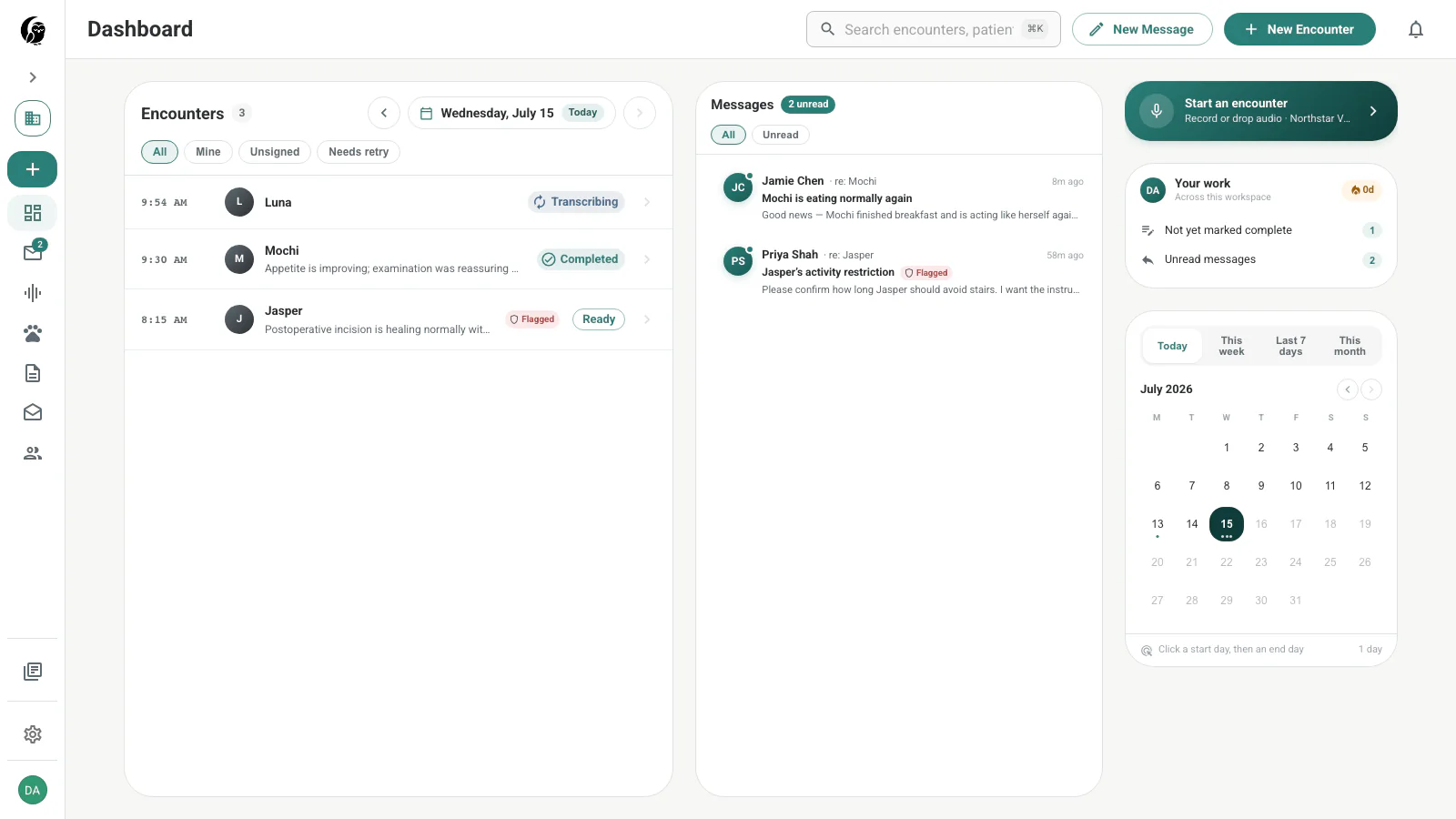
The Dashboard is your landing page. It keeps the selected day’s encounters, recent messages, recording shortcut, outstanding work, and activity calendar in one view.
Quick actions
Choose Start an encounter in the right rail or New Encounter in the top bar. Both open the same encounter drawer, where you can record with your browser microphone, add audio files, choose a patient, and select SOAP and discharge-note templates.
Encounter board
The encounter board starts on today. Use the arrows to move by day, or choose the date control to select a day or range. Filter the visible rows with All, Mine, Unsigned, and Needs retry. Choose an encounter to open its SOAP note, transcript, messages, and patient context.
Messages
The Messages panel shows recent owner replies alongside their patient context. Switch between All and Unread, or choose a message to open the related encounter’s Messages tab. Use Messages for the complete inbox.
Your work and calendar
Your work summarizes unsigned notes, unread messages, failures that need attention, and your current streak. The calendar shows encounter activity and changes the date or range displayed by the encounter board.