Messaging & Email Relay
Every outbound noctune message has a reply route. The route determines which address the recipient sees and where a reply arrives.
Reply routes
| Route | Recipient experience | Reply destination | Requirement |
|---|---|---|---|
| noctune Nest | A noctune relay identity; personal address stays hidden | Encounter thread or global Messages inbox | Nest entitlement |
| noctune (no reply) | From noreply@mail.noctune.ai; one-way message | Recipient cannot reply through that message | Available without Nest |
| Your personal email | Your personal address is shared | Your personal inbox | No Nest entitlement needed |
When Nest is active, a new composer starts on the Nest route. Otherwise it starts on no-reply. You can change the route before sending.
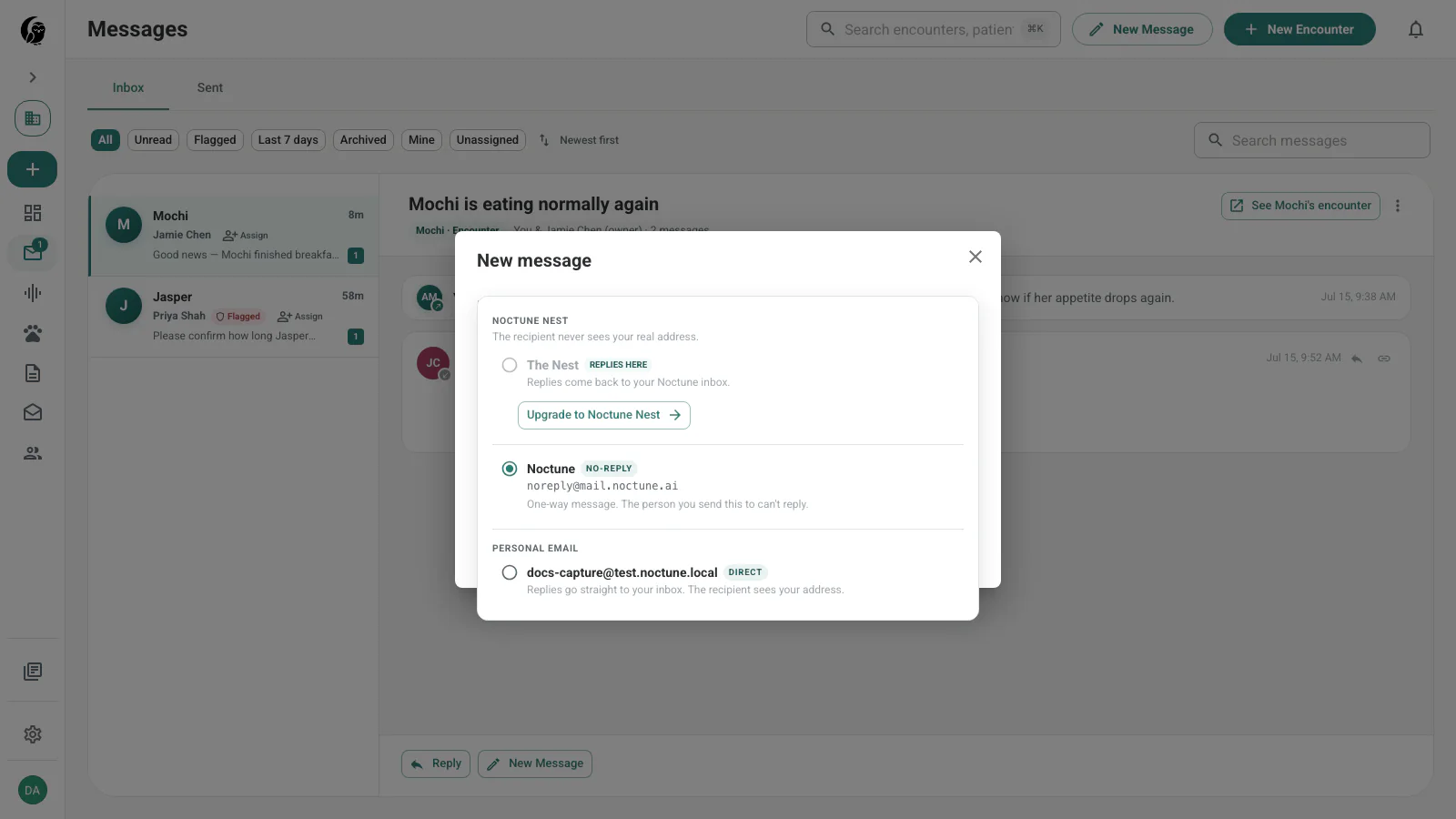
noctune Nest
Nest is the reply-enabled noctune inbox. The label adapts to context:
- In an encounter, This encounter keeps replies attached to that clinical record.
- In a global composer, The Nest or the patient’s Nest returns replies to Messages.
The recipient never needs a noctune account. They reply with ordinary email, and noctune threads the inbound message into Messages. Practice teammates can then see the same encounter context and assignment state.
No reply
Use noctune (no reply) for one-way communication. The composer explains that the recipient cannot respond and shows noreply@mail.noctune.ai. This route does not create a Nest conversation.
Personal email
Use Your personal email when the reply should leave noctune and go directly to your mailbox. The selector keeps a warning visible because this shares your address and removes the reply from the team’s noctune workflow.
Direct inbound handles
noctune also provides inbound handles that do not require an earlier outbound message. A personal or practice address under inbox.noctune.ai can receive direct mail in Messages. The Account tab shows the current personal handle; paid access can expose handle customization where available.
This differs from Nest: a handle is a standing inbox identity, while an encounter Nest route is tied to a particular visit.
Mail domains
| Domain | Purpose | Example shape |
|---|---|---|
mail.noctune.ai | Outbound transactional and no-reply mail | noreply@mail.noctune.ai |
replies.noctune.ai | Reply tokens for encounter-linked Nest mail | unique reply token at the domain |
inbox.noctune.ai | Personal and practice inbound handles | {handle}@inbox.noctune.ai |
The domains separate one-way sending, reply routing, and standing inbound mail.
Entitlement changes
If Nest is unavailable in the active billing workspace, the composer hides or disables that route and uses no-reply instead. Personal email remains a separate choice. Existing messages stay visible in the inbox even when the current workspace cannot start a new Nest send.